
Create AI Generated Food Images with Call The Service

The ultimate guide for restaurant, café, and beach club owners looking to elevate their digital menus and save money on food photography.

In the world of hospitality, visuals matter. Whether you’re running a lively beach club, a cozy café, or a full-service restaurant, mouth-watering menu images can dramatically increase customer engagement and sales. But hiring a professional photographer for every new dish, or every seasonal update, can quickly become expensive and time-consuming.

That’s why Call The Service (CTS) introduces one of the most impactful tools for modern hospitality businesses: AI generated food images. This feature lets you instantly create high-quality, professional dish photos without needing a camera, studio, or photography team.

In this blog, we’ll walk you through:

  • How to create AI generated food images using CTS
  • Why this feature saves money, time, and effort
  • How AI images enhance your digital menu and guest experience
  • A step-by-step guide based on the actual app flow

If you’re ready to boost your menu’s visual appeal while cutting costs, keep reading.

What Are AI Generated Food Images?  

AI generated food images are professionally styled dish photos created instantly using artificial intelligence, no photography equipment required. With CTS, you can simply enter the dish name and generate a realistic, customizable image that visually represents your menu item.

Hospitality venue owners love this feature because it provides:

  • Studio-quality images in seconds
  • Consistent styling across the entire menu
  • The ability to update dish images anytime
  • Low cost compared to traditional photography

In the next sections, you’ll learn exactly how to create these AI generated food images inside your CTS dashboard.

Step-by-Step: How to Create AI Generated Food Images Using Call The Service  

Below is the exact process shown in your app screenshots, broken down into simple steps.

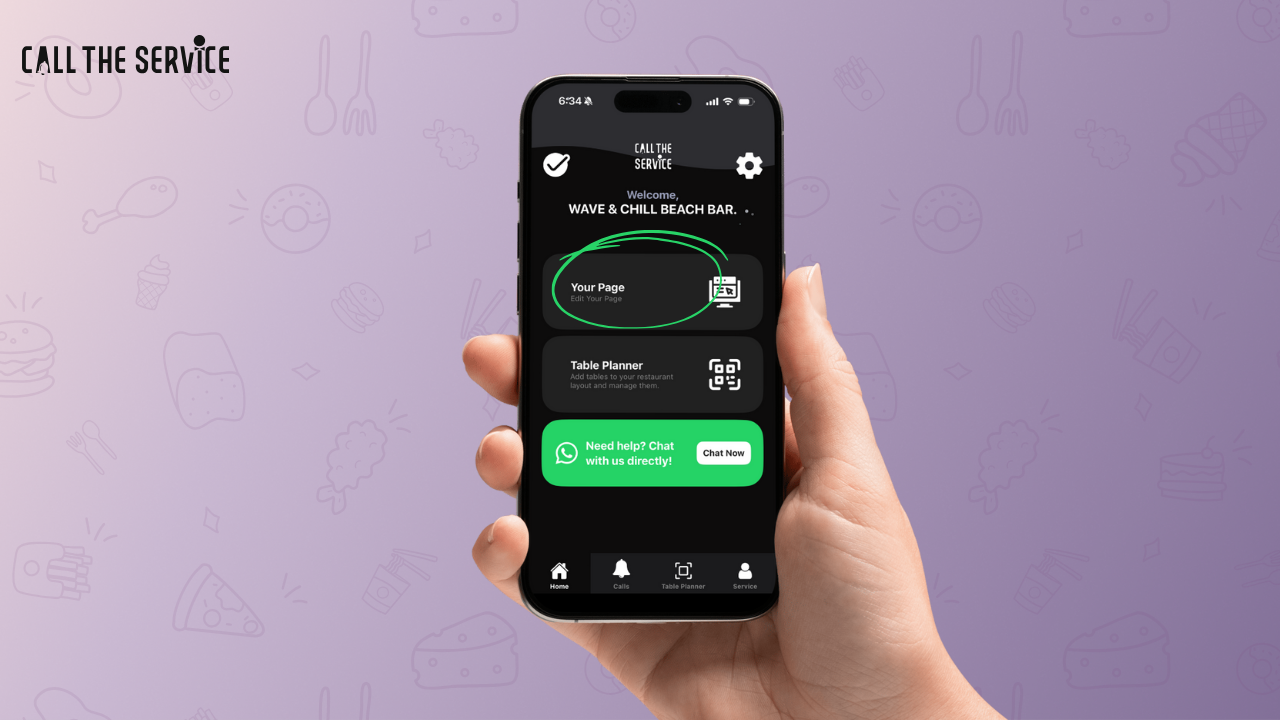
Step 1: Go to Your CTS Dashboard  

From the home screen, tap Your Page to start editing the content your guests see when scanning your QR code. This is where your digital menu lives.
ai generated food images

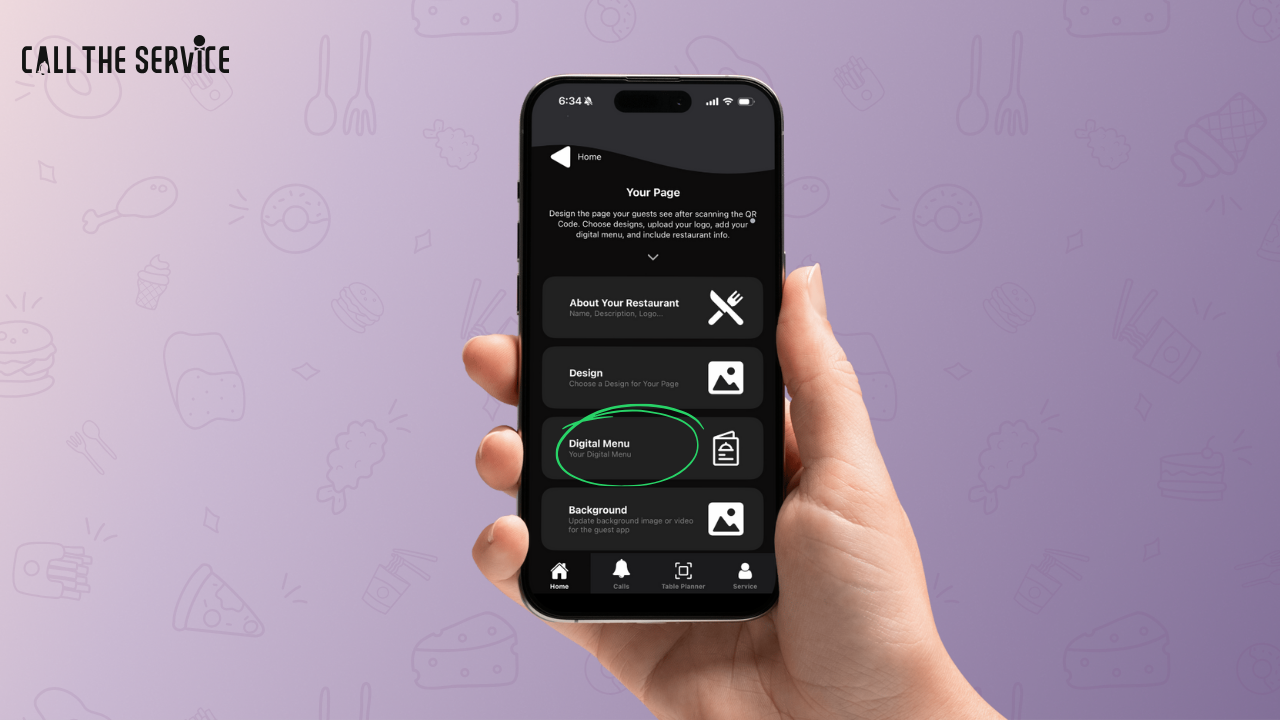
Step 2: Select “Digital Menu”  

Inside Your Page, select Digital Menu. This opens the area where your menus, categories, and products are stored.
ai generated food images

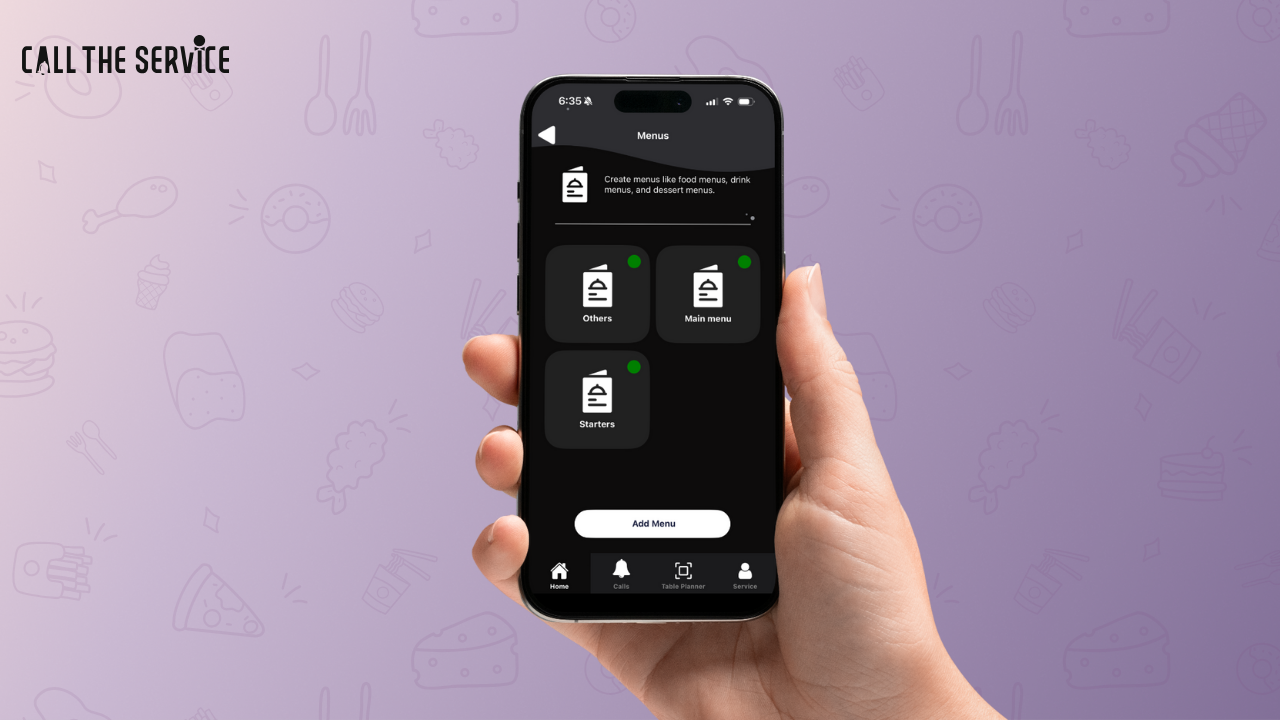
Step 3: Choose a Menu  

You will see menu types such as:

  • Main Menu
  • Starters
  • Others

Tap on the menu you want to edit or add dishes to.
ai generated food images


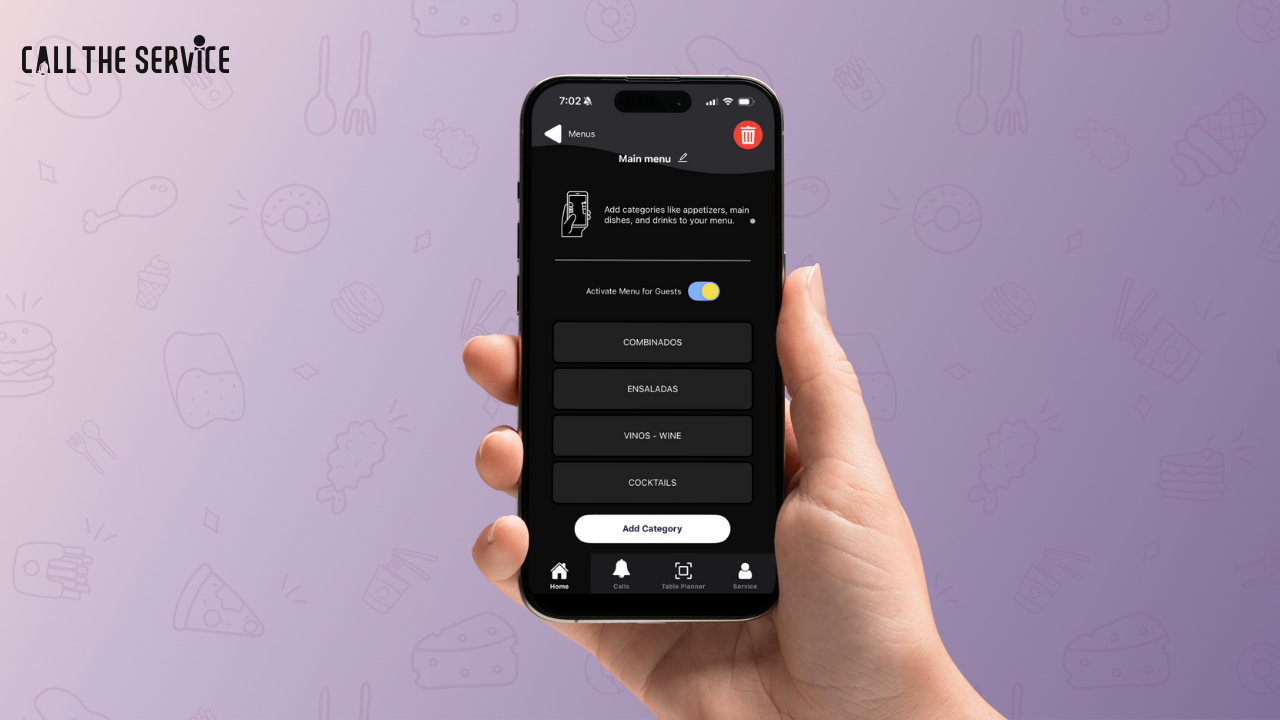
Step 4: Select a Category  

After opening your menu, select a category such as:

  • Non-veg Starters
  • Desserts
  • Drinks
  • Appetizers

You can also create a new category if needed.
Step 5: Add a Product or Edit an Existing One  

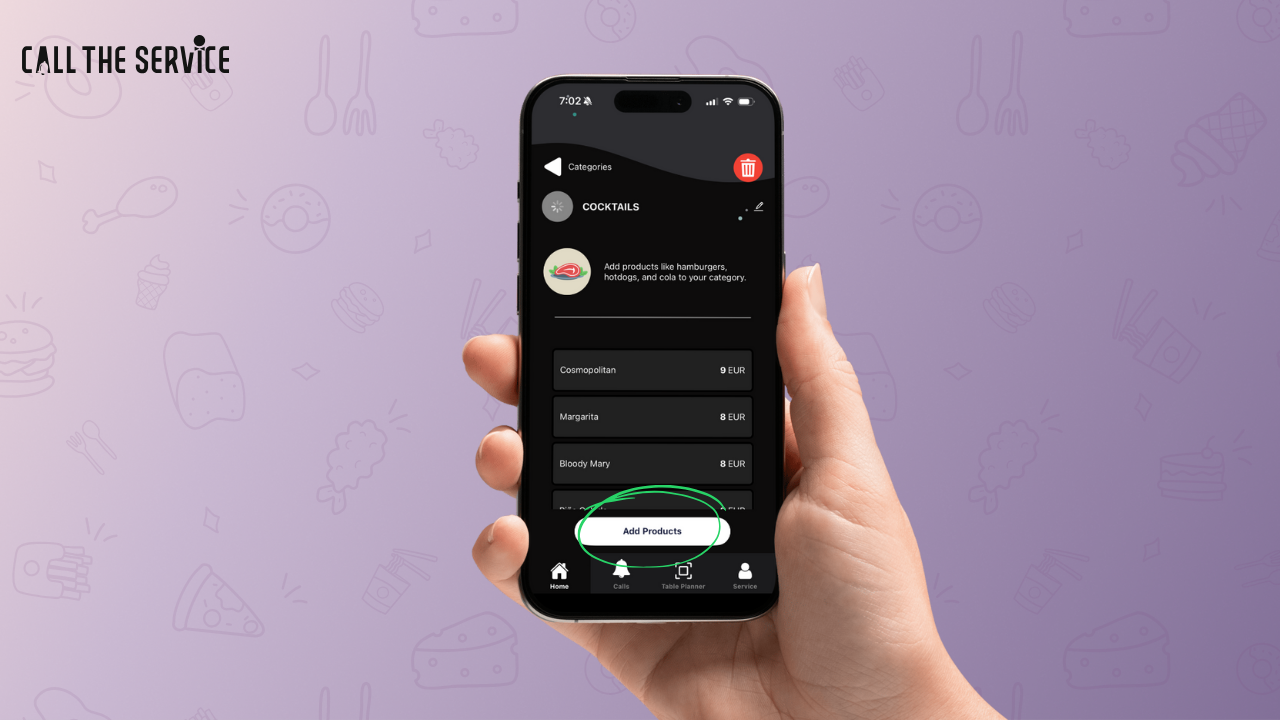
Tap Add Products to create a new dish OR select an existing item like Crispy Prawns to edit.

This will open the product details screen.
ai generated food images

Step 6: Fill in the Dish’s Details

Fill the details of the Dish or Drink you want to add. Give the price, volume and ingredients used.
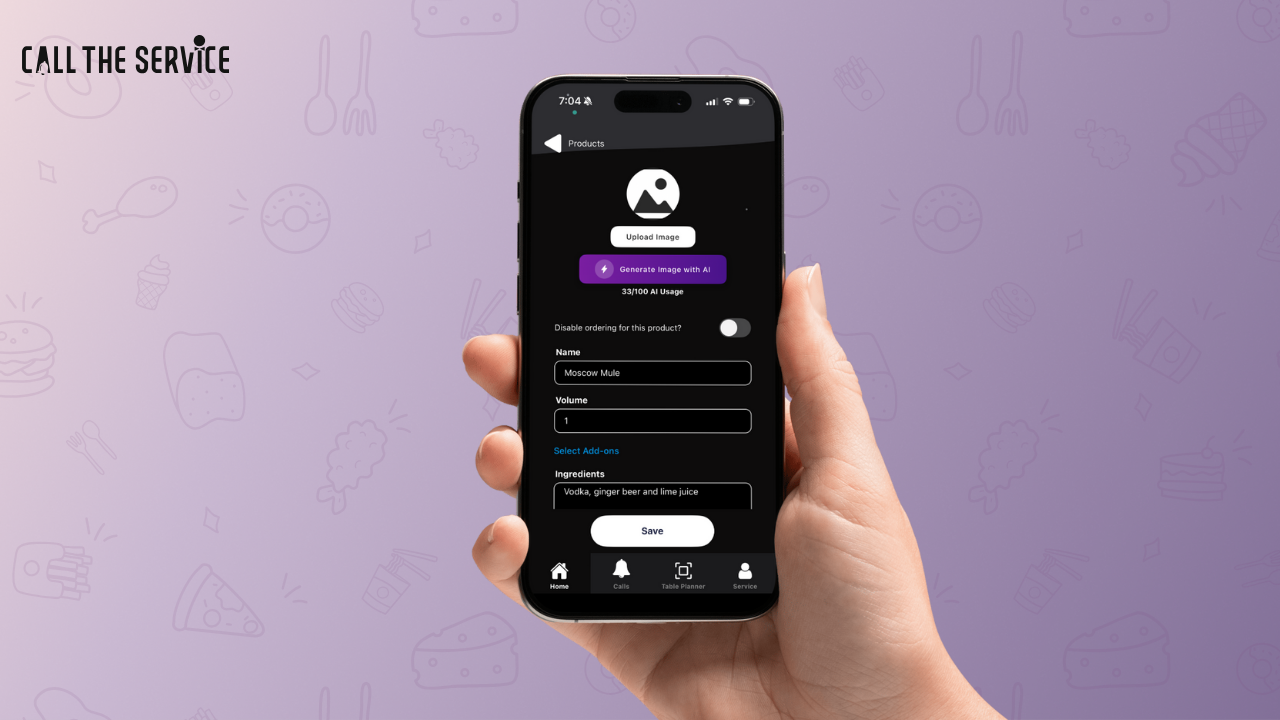
Step 7: Click “Generate Image with AI”  

This is where the magic happens.

You will see two options:

  • Upload Image from Gallery
  • Generate Image with AI

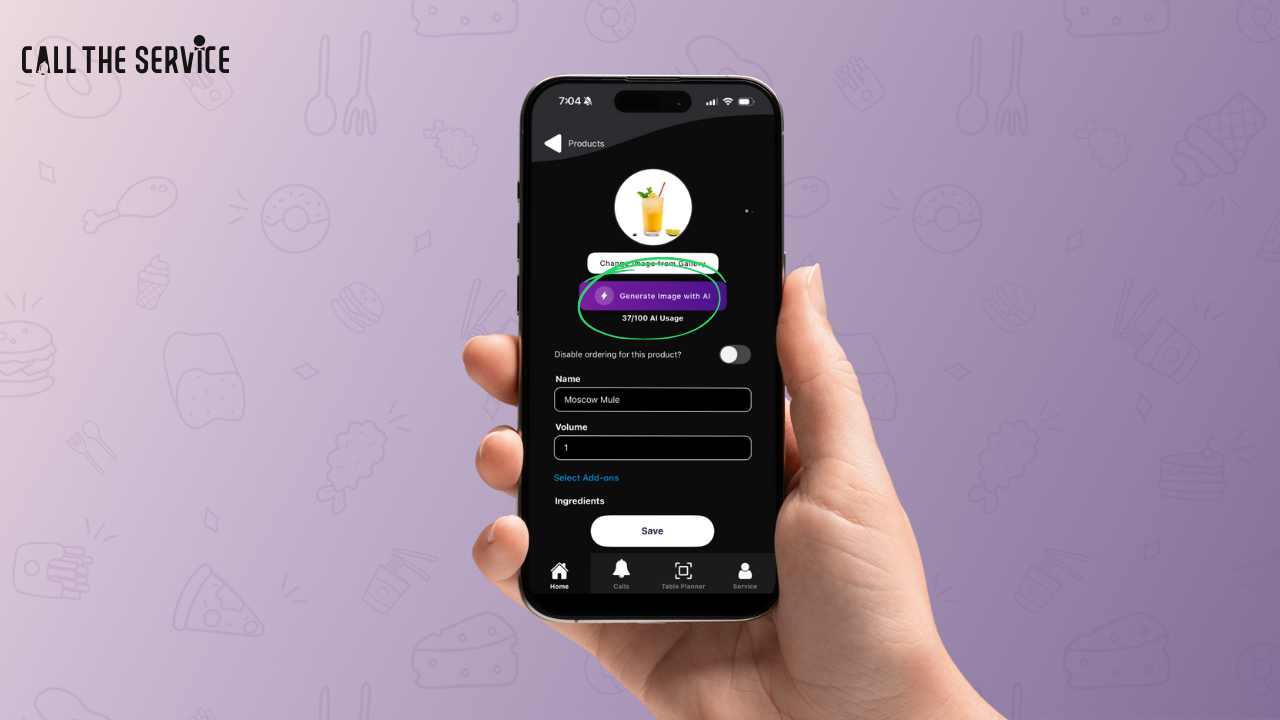
Tap Generate Image with AI. Review the generated image. If you want a different variation, you can generate again using your AI credits.
Once satisfied, tap Save.
Your AI usage count will be displayed, CTS provides 100 AI credits per cycle.
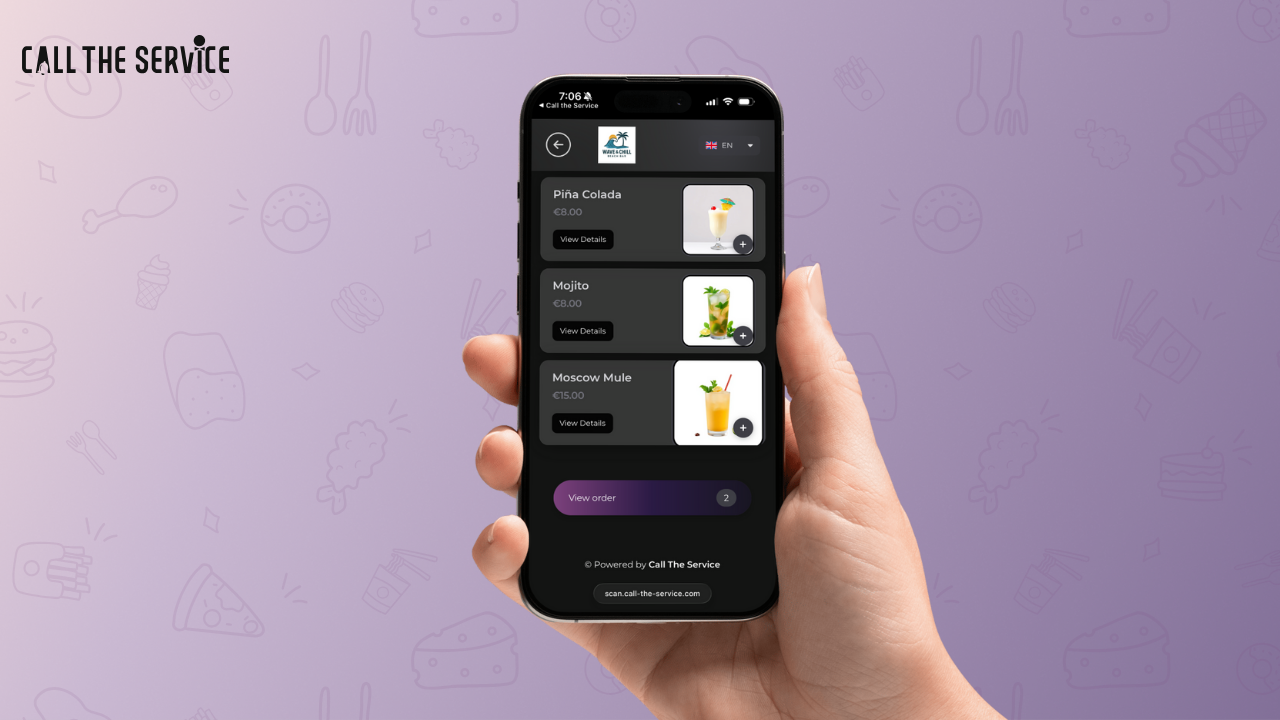
Step 8: Your Dish is Added  

Your menu now includes a high-quality, AI generated dish image ready for your guests to view.
ai generated food images

How AI Generated Food Images Help Save Money for Restaurants & Hospitality Venues  

One of the greatest advantages of using CTS is the cost reduction it offers. Traditional food photography can quickly eat into your profit margins, and here’s why.

1. No More Professional Photography Sessions  

A typical photoshoot for restaurant dishes costs anywhere between $300–$1,500 per session, depending on:

  • Photographer rates
  • Food styling
  • Lighting setup
  • Time spent shooting and editing
  • Number of dishes

With AI generated food images, you eliminate all of these expenses.

2. Instantly Update Seasonal or Daily Specials  

Beach clubs and cafés often change menus based on:

  • Fresh catch of the day
  • Seasonal fruits
  • Special promotions
  • Holiday menus

Instead of calling a photographer each time, you simply generate a new AI image in seconds.

3. Maintain Visual Consistency  

A common problem with traditional photography is inconsistency:

  • Lighting differs between shoots
  • Editing styles vary
  • Dish presentation changes

CTS ensures all AI generated food images follow a uniform aesthetic—making your digital menu look professional and cohesive.

4. Reduce Wastage from Photography Prep  

Food photography requires fresh ingredients, plating setups, and multiple attempts to get the perfect shot. This often leads to food being wasted.

With AI images:

  • No dish preparation is required
  • No ingredients are used
  • No waste is generated
  • This is especially useful for restaurants and beach clubs offering high-cost seafood dishes like lobster, prawns, or tuna steaks.

5. Save Time for Your Staff  

Your team can focus on service instead of:

  • Re-plating dishes
  • Holding photography lights
  • Clean-up after shoots

CTS’s AI feature produces images in seconds, allowing your staff to stay focused on guest satisfaction.

Why Beach Clubs, Cafés, and Restaurants Love AI Generated Food Images  

This feature is designed with hospitality needs in mind. Here’s why venue owners are adopting it:

✔ Perfect for beachfront dishes, cocktails, and seasonal items  

Beach clubs often rotate menus depending on weather, trends, and events.

✔ Great for cafés with large rotating pastry selections  

No need to photograph every croissant variation.

✔ Essential for restaurants wanting high-end presentation  

AI images can mimic premium styling instantly.

✔ Ideal for fast-changing menus  

Pop-up venues, beach parties, or happy-hour specials benefit the most.

Boost Your Menu Engagement with AI Generated Food Images  

Studies show that dishes accompanied by images sell up to 40% more than those without visuals. When guests scan your QR code menu, the first thing they notice is appearance. With ai generated food images, you ensure:

  • Faster order decisions
  • Higher perceived food quality
  • Improved guest satisfaction
  • Better upselling of add-ons or premium dishes

Restaurants using CTS report significant increases in digital menu interactions—because visually appealing menus make guests order more confidently.

Final Thoughts: The Future of Hospitality Menus Is AI-Driven  

As the hospitality industry continues to modernize, ai generated food images are becoming one of the most cost-effective tools for menu presentation. Restaurants, cafés, and beach clubs using Call The Service are already benefiting from:

  • Lower photography costs
  • Faster menu updates
  • Beautiful, consistent visuals
  • Higher order value and customer satisfaction

If you want to elevate your digital menu while saving money, embracing this feature is the smart move.

Start using AI-generated food images today with Call The Service. Upgrade to the Annual Plan to unlock AI images, custom design tools, and premium features ,  all in one powerful platform.

AI is transforming how restaurants present their menus, and ai generated food images are now one of the fastest, most affordable ways to upgrade your visual branding. Instead of relying on expensive photo shoots or outdated images, restaurants can now create high-quality food visuals in minutes using Call The Service.

Leave a Reply

Your email address will not be published. Required fields are marked *